Know what your photos reveal.
Inspect hidden photo metadata. Remove privacy-sensitive data before you share.
$2.99, once. iPhone and iPad, iOS 17 or later. No account, no subscription.
Your photos are processed on your device.
Metadata is read and rewritten locally. There is nothing to opt out of, because there is nothing collected.
Scrub has no networking code. It cannot upload a photo, because it has nowhere to send one.
Nothing to sign in to, no analytics, no advertising identifier, no crash reports.
Your original file is never modified. Scrub writes a separate, clean copy.
From a photo you can't read to a file you can send.
Choose a photo from your library or take a new one. Scrub asks for access to that photo only.
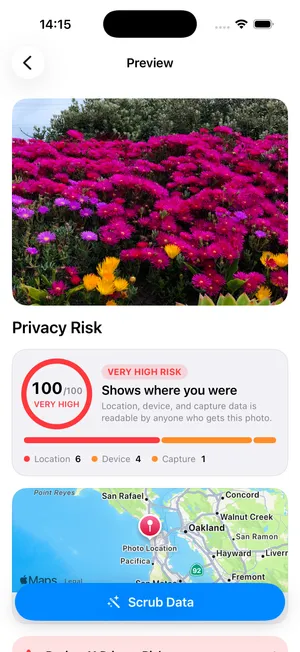
Every EXIF, GPS, TIFF and XMP field is read and listed with the value it would expose.
Fields are grouped by what they reveal, each group explained in a sentence and placed on a map where a location is recorded.
Remove everything the format allows, or keep only the fields the photo needs to display correctly.
A before and after count of every field, so you can confirm the new file is clean.

Send the scrubbed copy anywhere. The original stays exactly as it was.
Every field a photo carries, including the ones Photos never shows you.
Scrub reads EXIF, GPS, TIFF and XMP blocks and reports what it finds, field by field, with the value it would expose. A risk score summarises the file at a glance; the list underneath is the evidence for it.
- EXIF
- Capture date and time, exposure, lens, software version
- GPS
- Coordinates, altitude, bearing, speed, GPS timestamp
- TIFF
- Camera make, model, orientation, resolution
- XMP
- Creator fields, editing history, embedded location
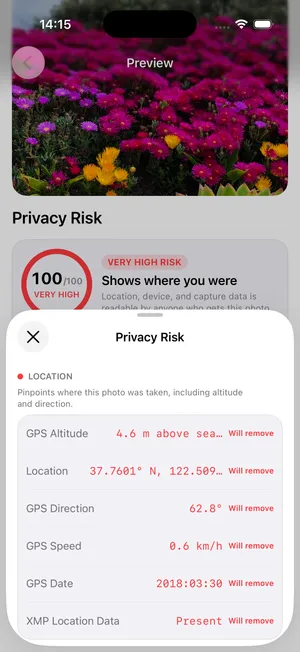
A coordinate is not information. A neighbourhood is.
Fields are grouped by what they give away — where you were, which device you used, when you pressed the shutter — and each group is explained in a sentence. The recorded location is placed on a map, so you can see the exposure rather than read it.
- Location
- Where the photo was taken, to within a few metres
- Device
- The phone, lens and software that took it
- Capture
- The date and time, down to the minute
Two modes, a written receipt, and your original left alone.
Remove every field the format allows, or keep the two the photo needs to display correctly. Either way Scrub writes a new file and reports the before and after count, so sharing is the only step left.
Strips every field the format allows, including orientation and colour profile.
Removes location, device and timing. Keeps the two display fields a photo needs.
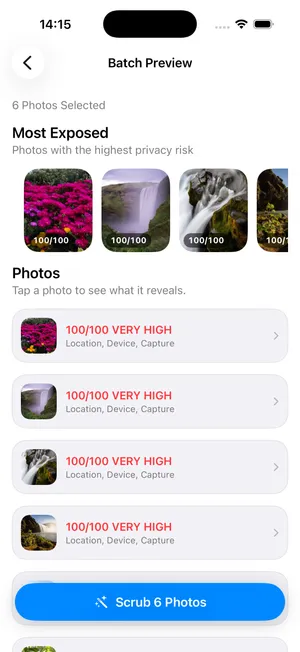
A camera roll is a pattern, not a photo.
Select up to fifty photos and Scrub reports them together: which categories appear, which files carry the most, and which ones sit close enough to each other to describe a routine. Then it cleans them in one pass.
What Scrub reads, and what it leaves behind.
- Formats
- HEIC, JPEG, PNG, TIFF
- Metadata read
- EXIF, GPS, TIFF tags, XMP packets, PNG text chunks
- Removed
- Coordinates, altitude, bearing, speed, GPS timestamp, camera make and model, lens, software, capture date, XMP location and creator fields
- Kept by default
- Orientation and colour profile, so the photo still displays correctly
- Output
- A new file saved alongside the original, at the original resolution
- Requirements
- iOS 17 or later. iPhone and iPad. No network connection needed at any point.
$2.99. Once.
No account, no subscription, no analytics, no advertising identifier. A utility you buy and own.
Download on the App Store